MSU Social Feeds & Rewards
MSU Social Feeds & Rewards – Step-by-Step Guide for Unit Leaders
MSU Social Feeds & Rewards – Step-by-Step Guide for Unit Leaders
This guide breaks down exactly how the system works—from a single member earning points to a fully built-out unit maximizing tickets and raffle potential.
Step 1: Start with Individual Engagement
Everything begins with a single user.
- A logged-in user visits the Social Feeds page
- They browse content from:
- MSU Brand Feed (official posts)
- Featured Unit Socials (connected unit content from X, Instagram, YouTube, TikTok)
- Every time they click and engage with a post → +1 point (ticket)
- Each post can only be counted once per user (keeps it fair)
- Points are automatically tracked in the background (no manual action needed)
Result:
A single user can passively earn tickets just by engaging with content.
Step 2: Points → Tickets (Before Joining a Unit)
- If the user is not in a unit yet, points stay on their personal profile
- These points do NOT contribute to any unit yet
Important:
The real value starts when users join a unit.
Step 3: Unit Leaders Add Members
This is where Unit Leaders come in.
- Go to your Unit Management Dashboard
- Before clicking into your main profile, you'll notice a Members & Ticket
- Generate an invite link
- Share it with your members
- Members request to join → Leader approves them
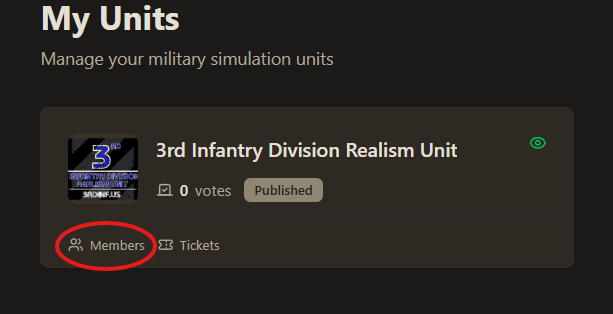
Once approved:
- That member is now officially part of your unit
- All future points they earn convert into unit tickets automatically
Step 4: Automatic Ticket Contribution
After joining a unit:
- Every engagement (click, like, etc.) = 1 ticket for the unit
- No manual claiming required—it’s fully automated
- System uses backend logic to instantly assign tickets
If a member is in multiple units:
- They can choose:
- Priority Mode: All tickets go to one unit
- Round Robin Mode: Tickets are split across all joined units
Result:
More active members = more tickets flowing into your unit continuously.
Step 5: Scale Through “Units Helping Units”
This is the core growth engine.
- Members are encouraged to engage with other units’ content
- That engagement helps:
- Boost visibility on external platforms (algorithm advantage)
- Drive traffic back to MSU
- MSU itself brings 30–40K platform reach, compared to ~2K typical Discord reach
Result:
By supporting other units, your unit also benefits—creating a shared growth loop.
Step 6: Monitor Progress (Leaderboard)
- Open the Leaderboard (trophy icon)
- See top 25 units ranked by ticket balance
- Updates every 60 seconds
Use this to:
- Track performance
- Motivate members
- Push friendly competition
Step 7: Enter Raffles (Unit Leaders)
Once your unit has tickets:
- Go to the Rewards tab
- View total unit ticket balance
- Enter tickets into active raffles
How winning works:
- More tickets entered = higher chance to win
- Winners are selected via weighted random draw
- Results are publicly displayed
Step 8: Maximize Visibility (Critical Step)
To fully leverage the system:
- Connect your unit’s social accounts in your Unit Dashboard
- Ensure your content appears in:
- Featured Unit Social Feed
- Your Unit Profile Social Section
Why this matters:
- More exposure inside MSU
- More engagement from other users
- More tickets generated from your content
Step 9: Create the Positive Loop
When everything is working together, you get:
Great Content → Community Engagement → Algorithm Boost → More Visibility → More Tickets → Better Raffle Odds → Stronger Unit Growth
Key Takeaway for Unit Leaders
Your job isn’t just to recruit—it’s to activate your members.
- Add as many members as possible
- Encourage daily engagement
- Promote interacting with other units
- Keep your social content active and connected
The more your members participate, the more your entire unit benefits.
Checkout our Video explaining this full process: Social Feeds